

In this article I'm going to walk through containerising a Laravel application. Along the way I'll cover some of the terminology you'll hear around Docker, some of the console commands and Dockerfile syntax.
First up, creating a new Laravel project:
$ docker run --rm \
    -v "$PWD":/app \
    composer/composer:latest create-project laravel/laravel yorkshire
I'm going to use Laravel Octane and FrankenPHP. Partly because I haven't had the opportunity to use FrankenPHP yet, partly because of what is considered best practice with Docker. One process per container.
I don't want to use Apache. The other typical setup is PHP-FPM but that requires a separate web server (usually nginx), which means either separate containers (fine) or bundling both into a single container (less fine).
Bundling multiple services into a single container usually means running a process manager (like supervisord) as PID 1. This does work, but there's a big caveat. Docker (and orchestration layers like Docker Compose, ECS/Fargate, Kubernetes) track a container's liveness by the main process. If supervisord stays up then the container is "running".
In reality PHP-FPM or Nginx could have failed to start entirely, but at a glance your container is "healthy". I've been caught out by this once, I don't intend to get caught out by it again.
Runtimes like RoadRunner, FrankenPHP and Swoole avoid this problem entirely. The PHP runtime and the web server live in a single process. If anything goes wrong, the container exits which is the behaviour that container orchestrators expect.
$ docker run --rm \
    -v "$PWD":/app \
    composer/composer:latest require laravel/octane
The next step in the Octane documentation is to run an artisan command. I don't have PHP installed locally but I'm intending to use PHP 8.5.
$ docker run --rm \
    -v "$PWD":/app \
    -w /app \
    php:8.5-cli-alpine php artisan octane:install --server=frankenphp

Unable to find image 'php:8.5-cli-alpine' locally
8.5-cli-alpine: Pulling from library/php
f6b4fb944634: Already exists
a5424cfab6c5: Pull complete
ac4b4071f0ce: Pull complete
d98a03c89a0f: Pull complete
41a52491245a: Pull complete
89e9bac55326: Pull complete
bd6b7d8f5444: Pull complete
75b6e1e057da: Pull complete
8d87f65bbf37: Pull complete
Digest: sha256:f2f83d213e6edfe0e05144dfd7cc6aa1ea1d8bc446aa834d27a36ca1049091be
Status: Downloaded newer image for php:8.5-cli-alpine

0% [░░░░░░░░░░░░░░░░░░░░░░░░░░░░]      1378/152388328 bytes
3% [░░░░░░░░░░░░░░░░░░░░░░░░░░░░]   4961420/152388328 bytes
8% [▓▓░░░░░░░░░░░░░░░░░░░░░░░░░░]  13447421/152388328 bytes
10% [▓▓░░░░░░░░░░░░░░░░░░░░░░░░░░]  15413501/152388328 bytes
15% [▓▓▓▓░░░░░░░░░░░░░░░░░░░░░░░░]  23279294/152388328 bytes
19% [▓▓▓▓▓░░░░░░░░░░░░░░░░░░░░░░░]  29898430/152388328 bytes
20% [▓▓▓▓▓░░░░░░░░░░░░░░░░░░░░░░░]  30521022/152388328 bytes
27% [▓▓▓▓▓▓▓░░░░░░░░░░░░░░░░░░░░░]  41810290/152388328 bytes
30% [▓▓▓▓▓▓▓▓░░░░░░░░░░░░░░░░░░░░]  45741440/152388328 bytes
36% [▓▓▓▓▓▓▓▓▓▓░░░░░░░░░░░░░░░░░░]  55211105/152388328 bytes
40% [▓▓▓▓▓▓▓▓▓▓▓░░░░░░░░░░░░░░░░░]  60961889/152388328 bytes
43% [▓▓▓▓▓▓▓▓▓▓▓▓░░░░░░░░░░░░░░░░]  66896682/152388328 bytes
49% [▓▓▓▓▓▓▓▓▓▓▓▓▓░░░░░░░░░░░░░░░]  74891071/152388328 bytes
50% [▓▓▓▓▓▓▓▓▓▓▓▓▓▓░░░░░░░░░░░░░░]  76201791/152388328 bytes
54% [▓▓▓▓▓▓▓▓▓▓▓▓▓▓▓░░░░░░░░░░░░░]  83156799/152388328 bytes
58% [▓▓▓▓▓▓▓▓▓▓▓▓▓▓▓▓░░░░░░░░░░░░]  89258050/152388328 bytes
60% [▓▓▓▓▓▓▓▓▓▓▓▓▓▓▓▓░░░░░░░░░░░░]  91463554/152388328 bytes
65% [▓▓▓▓▓▓▓▓▓▓▓▓▓▓▓▓▓▓░░░░░░░░░░]  99742940/152388328 bytes
68% [▓▓▓▓▓▓▓▓▓▓▓▓▓▓▓▓▓▓▓░░░░░░░░░] 104789376/152388328 bytes
70% [▓▓▓▓▓▓▓▓▓▓▓▓▓▓▓▓▓▓▓░░░░░░░░░] 106672987/152388328 bytes
76% [▓▓▓▓▓▓▓▓▓▓▓▓▓▓▓▓▓▓▓▓▓░░░░░░░] 117129834/152388328 bytes
80% [▓▓▓▓▓▓▓▓▓▓▓▓▓▓▓▓▓▓▓▓▓▓░░░░░░] 121926250/152388328 bytes
86% [▓▓▓▓▓▓▓▓▓▓▓▓▓▓▓▓▓▓▓▓▓▓▓▓░░░░] 131513103/152388328 bytes
89% [▓▓▓▓▓▓▓▓▓▓▓▓▓▓▓▓▓▓▓▓▓▓▓▓▓░░░] 136884263/152388328 bytes
90% [▓▓▓▓▓▓▓▓▓▓▓▓▓▓▓▓▓▓▓▓▓▓▓▓▓░░░] 137277479/152388328 bytes
95% [▓▓▓▓▓▓▓▓▓▓▓▓▓▓▓▓▓▓▓▓▓▓▓▓▓▓░░] 144792704/152388328 bytes
99% [▓▓▓▓▓▓▓▓▓▓▓▓▓▓▓▓▓▓▓▓▓▓▓▓▓▓▓░] 151533651/152388328 bytes
100% [▓▓▓▓▓▓▓▓▓▓▓▓▓▓▓▓▓▓▓▓▓▓▓▓▓▓▓▓] 152388328/152388328 bytes
   INFO  Octane installed successfully.
How do you know if someone is from Yorkshire?
Don't worry they'll tell you.
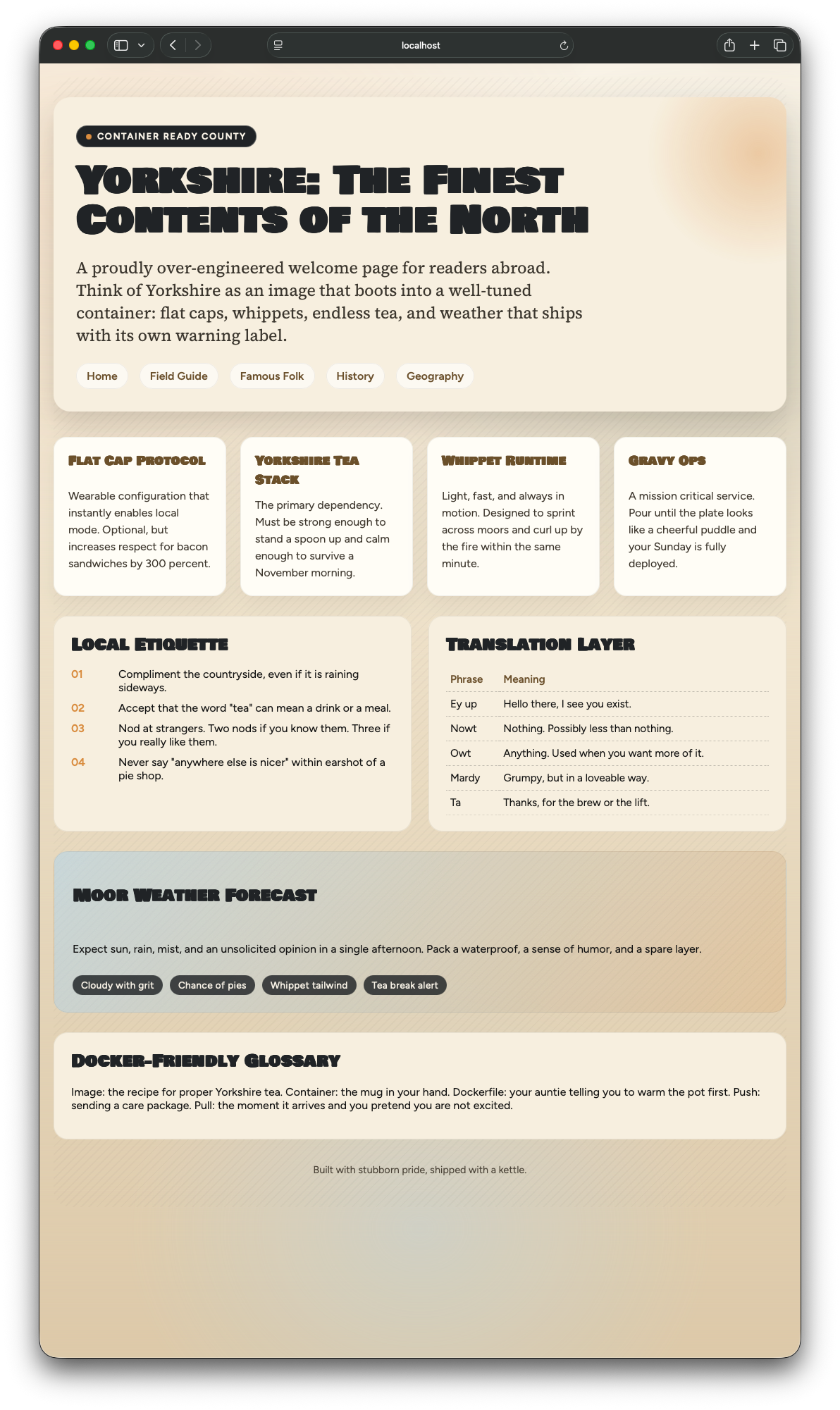
If you didn't clock the best tea in the world in the banner image, shame on you. To make the article and the containerised application a bit more interesting I asked Chat-GPT Codex to create a few static pages about Yorkshire. The vast majority of people who read my blog, don't live in the UK, so a perfect opportunity to talk about where I live.
Codex's idea of tongue-in-cheek Yorkshire humour is quite something as well...

Dockerfile
So far I’ve run composer and artisan using pre-built images from Docker Hub. To run a Laravel application, we need something more custom — a Dockerfile. You can think of a Dockerfile as a set of build instructions that tell Docker how to assemble an image.
A Dockerfile always starts with FROM - you have to start from something.
The other commands you'll most often use are:
COPY: Works much likecp. Used to copy files from your local machine into the containerWORKDIR: Acts likecdinside the container. It sets the default directory for every command that follows.RUN: Think of this as a bash shell running inside the container.apt update,mkdir storage,composer install,rm -rf *ENTRYPOINT: This tells Docker: "When this container starts, this is the main process." It turns the container into a single executable.npm run dev,php artisan octane:start,cowsay eyup mush
 Docker Inc
FROM dunglas/frankenphp:php8.5.1

# Install required PHP extensions
RUN install-php-extensions \
    opcache \
    pcntl \
    zip

# Copy the composer executable from the Composer docker image
COPY --from=composer/composer:latest /usr/bin/composer /usr/bin/composer

# Copy the source code from our local machine into the /app directory in the container
COPY . /app

# Create the storage directories and set permissions
RUN mkdir -p \
    storage/framework/sessions \
    storage/framework/views \
    storage/framework/cache \
    storage/logs \
    bootstrap/cache \
    && chmod -R 777 storage bootstrap/cache

# Run composer install
RUN /usr/bin/composer install --no-dev --optimize-autoloader

# When this container starts, this is the single command it runs.
# We start 'octane', which serves the application.
ENTRYPOINT ["php", "artisan", "octane:frankenphp"]
We will also need a .dockerignore file. This functions in much the same way as .gitignore.
Currently the Dockerfile copies everything from our local machine to the container. We don't want to copy the vendor or the storage directories into the container.
# .dockerignore

vendor/
storage/
Once that's in place - we need to build an image from our instructions (Dockerfile).
A Docker image is an immutable snapshot containing everything required to run the application. You won’t see a single file appear anywhere when it’s created, because an image isn’t a file in the traditional sense. It’s a collection of filesystem layers that Docker stores and manages for you.
Once an image is built, it never changes. If you want to alter anything, you build a new image.
$ docker build -t yorkshire .

 => [internal] load build definition from Dockerfile                                                                                                                                                   0.0s
 => => transferring dockerfile: 817B                                                                                                                                                                   0.0s
 => [internal] load metadata for docker.io/dunglas/frankenphp:php8.5.1                                                                                                                                 1.5s
 => [internal] load metadata for docker.io/composer/composer:latest                                                                                                                                    0.0s
 => [auth] dunglas/frankenphp:pull token for registry-1.docker.io                                                                                                                                      0.0s
 => [internal] load .dockerignore                                                                                                                                                                      0.0s
 => => transferring context: 57B                                                                                                                                                                       0.0s
 => [stage-0 1/6] FROM docker.io/dunglas/frankenphp:php8.5.1@sha256:7082c1dfeb256a5dd65961e790253aad859e8fd7ff2f38e54d43f81c0735fafe                                                                   0.0s
 => FROM docker.io/composer/composer:latest                                                                                                                                                            0.0s
 => [internal] load build context                                                                                                                                                                      0.0s
 => => transferring context: 28.77kB                                                                                                                                                                   0.0s
 => CACHED [stage-0 2/6] RUN install-php-extensions     opcache  pcntl     zip                                                                                                                         0.0s
 => CACHED [stage-0 3/6] COPY --from=composer/composer:latest /usr/bin/composer /usr/bin/composer                                                                                                      0.0s
 => [stage-0 4/6] COPY . /app                                                                                                                                                                          0.4s
 => [stage-0 5/6] RUN /usr/bin/composer install --no-dev --optimize-autoloader                                                                                                                         6.7s
 => [stage-0 6/6] RUN mkdir -p     storage/framework/sessions     storage/framework/views     storage/framework/cache     storage/logs     bootstrap/cache     && chmod -R 777 storage bootstrap/cach  0.2s
 => exporting to image                                                                                                                                                                                 0.4s
 => => exporting layers                                                                                                                                                                                0.4s
 => => writing image sha256:3eb9a344b2ea1ca1b2235a07f21432ae0f672f794a2c33d147f346038b892b9b                                                                                                           0.0s
 => => naming to docker.io/library/yorkshire
Breaking down that command we get:
docker build: Hey Docker, build me an image-t yorkshire: Tag the image asyorkshire.: Look for theDockerfilein the current directory
Assuming that finished without errors - you've just built a containerised Laravel application.
Simples.

Tags
We’ve already been using tags without really calling them out: php:8.5-cli, dunglas/frankenphp:php8.5.1, composer/composer:latest.
A tag is simply a version label for an image. Its format is always image_name:tag. Whenever Docker needs an image, it follows a simple rule:
- Check your local machine.
- If it’s not there, try to pull it from Docker Hub.
We tagged the image we built, so we can run it in the next step.
A Warning on :latest
You will often see tutorials use php:latest or mysql:latest. Whilst convenient, I would not recommend.
At the time of writing, php:latest resolves to version 8.5.1. That won't always be true. In production, always be explicit. Pin your versions (php:8.5.1). Otherwise, one day you'll restart a container and get a Windows style update - one you didn't ask for.

Building a containerised application probably feels a bit anticlimatic. As I mentioned earlier it doesn't even generate any artifacts you can see in your filesystem. No folder full of compiled output, no large image file. The image exists inside Docker's internal storage and you interact with it through Docker commands.
So let's run the thing.
The command docker run creates a running container from an image. If an image is a snapshot, a container is that snapshot brought to life - a running process with a filesystem, network and process space.
Unlike earlier when we ran composer or PHP via Docker, our application needs to accept incoming web requests. By default, containers are isolated from the host machine's network. Nothing gets in or out unless you explicitly allow it.
That's where port publishing comes in. The -p flag creates a tunnel between your machine and the container. FrankenPHP binds HTTP to port 8000 and HTTPS to port 443 inside the container, so we need to map those to ports on our local machine.
$ docker run -p 80:8000 -p 443:443 -p 443:443/udp yorkshire

INFO  Server running….

Local: http://127.0.0.1:8000

Press Ctrl+C to stop the server

WARN  Caddyfile input is not formatted; run 'caddy fmt --overwrite' to fix inconsistencies.

WARN  HTTP/2 skipped because it requires TLS.

WARN  HTTP/3 skipped because it requires TLS.
Breaking down the command we get:
docker run: Create and start a container-p 80:8000: Port publishing, in the formathost:container. Requests hitting port 80 on my machine get forwarded to port 8000 inside the container. Why not just use 8000:8000? I could, but port 80 is the default for HTTP - it means I can visithttp://localhostinstead ofhttp://localhost:8000.-p 443:443: Same idea for HTTPS traffic.-p 443:443/udp: HTTP/3 runs on QUIC, which uses UDP rather than TCP. Without this, you're limited to HTTP/1.1 and HTTP/2. FrankenPHP supports HTTP/3 out of the box, so we might as well enable it.yorkshire: The image to run. Docker checks locally first, then pulls from Docker Hub if it can't find it.

Opening http://localhost in my browser, I'm presented with a website about the best county in England:
I've pushed the image to Docker Hub so you can run it yourself without building anything.
$ docker build --platform=linux/amd64 -t clegginabox/yorkshire .
$ docker push clegginabox/yorkshire
The --platform=linux/amd64 flag is worth a mention. By default, Docker builds images for your host machine's architecture. I'm on an Apple Silicon Mac, which means without that flag I'd get an ARM64 image. That's fine locally, but most cloud servers run on x86_64.
Now, anyone can pull and run it:
$ docker run -p 80:8000 -p 443:443 -p 443:443/udp clegginabox/yorkshireMy AWS account is managed by Terraform, so spinning up the infrastructure to host this was straightforward (maybe a topic for another day). You can see it running here:
A small confession: the image I've actually deployed is slightly different from what we've built here. I'm using a multi-stage build to keep the final image size lean and to make sure there's no build-time dependencies (like Composer) in the runtime image. I'll cover this in more detail in the future.
This is no good for local development
What we've built works brilliantly for deployment. Build an image, push it, run it anywhere. But for local development? No thanks.
If I try and add another translation to the homepage - "Sort thi sen art". I save the file, refresh the browser, nothing changes.
If you remember what I said earlier, Docker images are immutable. If you want to make a change - you need to build another image. That means running docker build which runs composer install. Then docker run again. I've got no time for that faffin' about.
Thankfully there's a nice solution to this problem - Docker Compose.
To conclude
We've gone from an empty directory to a containerised Laravel application running on FrankenPHP. Along the way we've covered:
- Why single-process containers matter for orchestration
- The core Dockerfile instructions:
FROM,COPY,WORKDIR,RUN, andENTRYPOINT - The difference between images and containers
- Building, tagging, and running containers
The same image I built and ran on my Mac is now running on AWS. That's the promise of containers - and we've not even got to the good bit yet.
In Part 3, I'll cover setting up a complete development stack with Docker Compose. In Part 4, I'll tackle security hardening, multi-stage builds, health checks and other production steps.
If there's anything in particular you want to see let me know in the comments below. React? Vue? Meilisearch? Running multiple compose projects at the same time?
